
Silom POS is connected, customers redeem their coupons, staff scan them — and the bill total stays where it was. The usual cause is not the connection at all. It is the reward's name, because that is the single piece of information the POS uses to decide how much to take off. Naming one reward correctly takes about 2 minutes.
⚡ Quick Path:
Reward→Reward Group List→View Rewards→Editon that reward → theReward Infotab → theMain infosection → theReward name (internal)field → type the name in the right structure →Save
📌 Read this first: this article covers rewards that already exist. It does not cover connecting Silom POS to DeepBLOK for the first time, which the onboarding team does when your system goes live.
Requirements before you start
- A working connection between DeepBLOK and Silom POS — with no connection in place, naming the reward correctly still will not discount anything at the counter
- A reward that already exists and already points at a coupon bucket — this article edits an existing reward rather than building one
- The discount figure, already agreed — you need to know whether it is a number of baht or a percentage, because that figure goes straight into the name
- The product's Barcode ID, for a free item only — ask whoever maintains the product data on the Silom POS side
The 3 discounts, and the name each one needs
The system supports 3 discounts, and what tells it which one you mean is the shape of the name you type into Reward name (internal). The name therefore picks the kind and sets the figure in one go.
The part in curly braces is what you replace — the braces themselves are not typed. The name runs together with no space between the word and the figure, and the figure in the name is the figure the POS actually takes off. Changing a 20-baht discount to a 50-baht one means editing the name, because there is no separate field for the amount.
✅ Check your understanding: a campaign wants 15% off — what goes in the field? The answer is Discount15%, not Discount 15% and not 15% off: the name runs together, it is written in English, and it needs the % on the end to be read as a percentage at all.
Picking the one that fits the campaign
⚠️ Note on cost: an amount off can be costed before the campaign starts — coupons issued, multiplied by the value of one. A percentage off cannot, because it rides on each customer's bill. Where the budget is already agreed, an amount off holds it far more tightly.
A free item is for pushing one product rather than discounting a whole bill, and it is the only one with extra work at the shop end — leave time for that coordination.
Naming a reward the POS can read, in 3 steps
Step 1 Open that reward's edit page
Go to Reward → Reward Group List, find the card of the group the reward sits in, and press View Rewards on the bar at the foot of that card. Press Edit on the reward's row. The Edit Reward page opens, split into 4 tabs, starting on the first one, Reward Info.
Step 2 Fill in the Reward name (internal) field
In the Reward Info tab, the first section is Main info. Find the Reward name (internal) field. This is the only field Silom POS reads. Type the name in the structure for the kind you picked, from the table above. The field carries a red asterisk and is required from the very first draft save, so no reward can be left with it empty.
On the line under this field: it says the field is used for searching and in reports only, and that customers never see this name. That is true for most brands — but for a brand connected to Silom POS this field is no longer an internal name alone, because the POS reads it to work out the discount. Do not rename it on the assumption that nobody sees it.
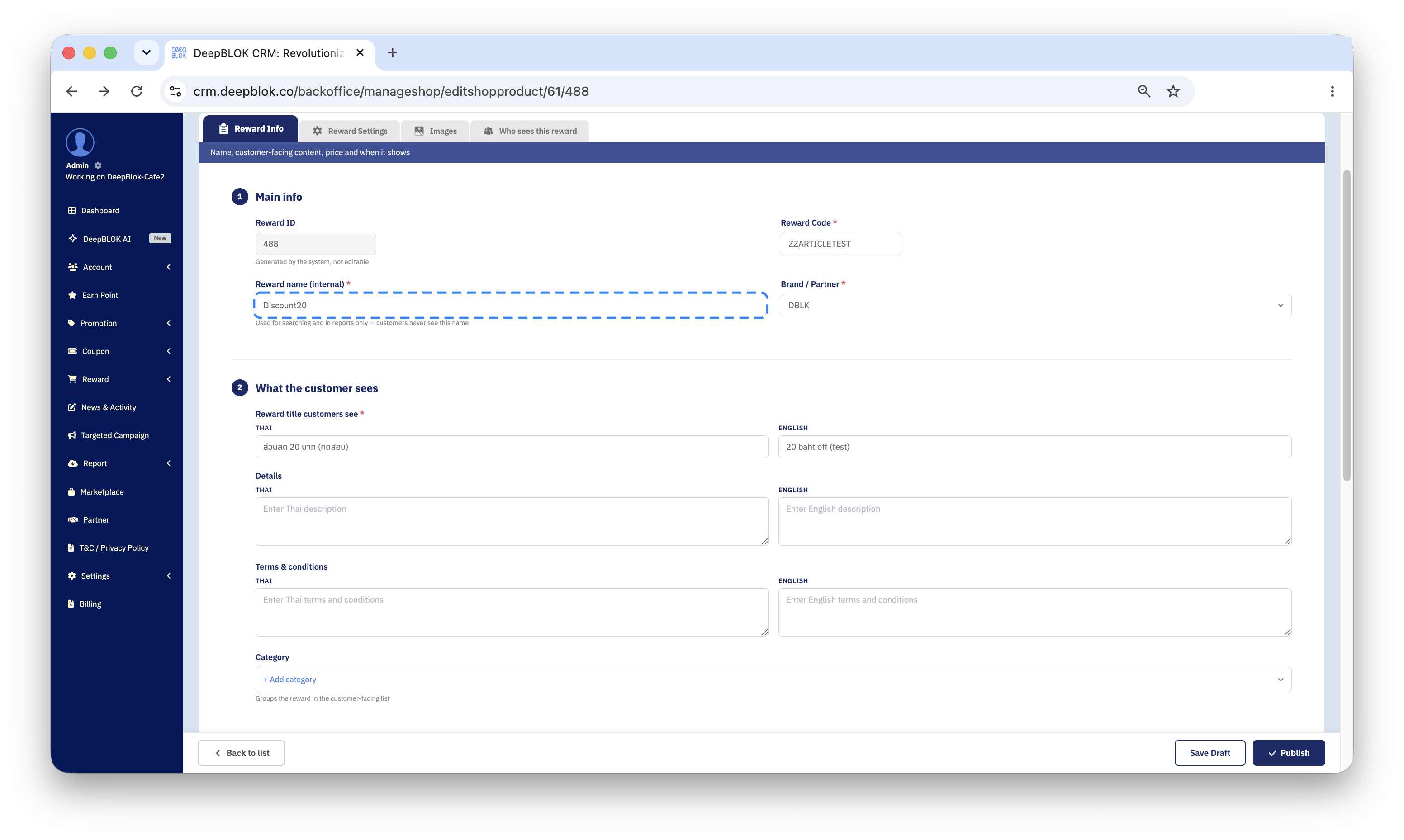
Notice that the Reward title customers see boxes in the section below read 20 baht off and ส่วนลด 20 บาท — deliberately different text from Reward name (internal), because the POS reads the upper field and the customer reads the lower ones.
Step 3 Save, then check it at the till
Press Save on the action bar at the foot of the page, which saves all 4 tabs at once. If the reward is still in Draft the button reads Save Draft.
If you picked the free-item structure, one thing is still outstanding: set that product's Barcode ID on the Silom POS side so it matches the figure you typed after Freeitem.
✅ Confirm it worked: run one real bill at the counter using a coupon from the reward you just edited, and watch the total on the Silom POS screen come down by the figure in the name. If the coupon is consumed but the total does not move, the name is not matching the structure yet — go back to Reward name (internal) and check the spacing and the spelling first.
The 3 kinds of name on one page
The Reward Info tab carries several name fields, and they go to different places. Only one of them is read by the POS.
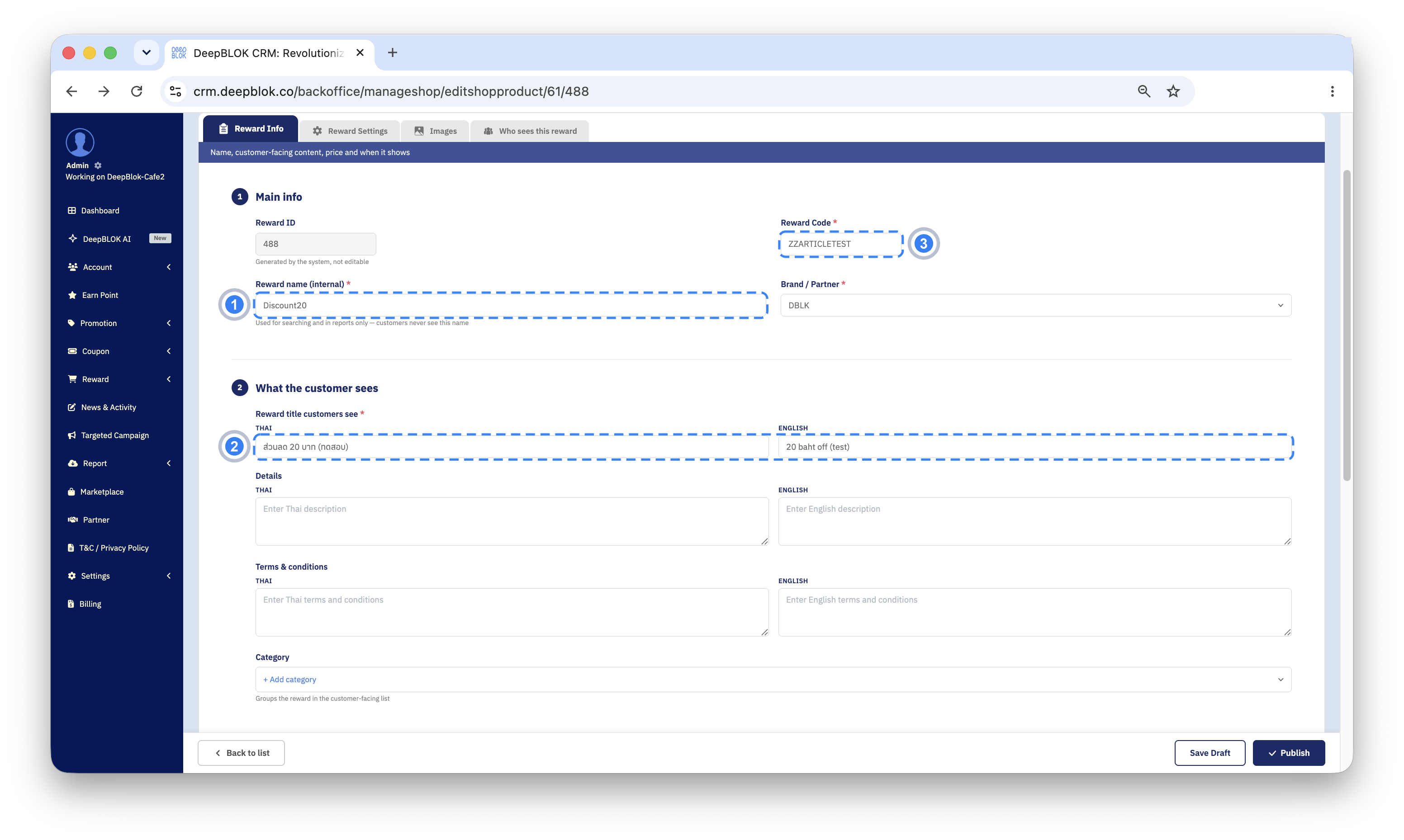
⚠️ Note on the field names: the picture shows the 3 groups set apart by job — Reward name (internal) holding Discount20 in the run-together structure the POS reads, Reward Title holding 20 baht off for the customer, Reward Code holding DISC20TEST for the team. All 3 read very much alike, and plenty of rewards are set up with Reward name (internal) and Reward title customers see holding the same text — which works fine until a POS is connected. Once Silom POS is in the picture, a customer-friendly name like 20 baht off leaves the POS with no figure to find. The safe arrangement is a structured Reward name (internal) with the friendly wording living in Reward title customers see instead.
Common Problems
Frequently Asked Questions
Q: Will customers see a name like Discount20?
A: No. What customers see in the member app comes from the Reward title customers see THAI and ENGLISH boxes, which are separate from Reward name (internal), so you can still give them something readable.
Q: Can we set up a discount other than these 3?
A: The system defines 3 name structures, in the table above. If a campaign needs different terms, raise it with a DeepBLOK representative before you plan the campaign around it.
Q: Can a free-item coupon give away more than 1 product?
A: The name structure takes a single Barcode ID, so one coupon maps to one product. For anything more, raise it with a DeepBLOK representative before planning the campaign around it.
Q: Can the kind of discount be changed mid-campaign?
A: Reward name (internal) can be edited from the reward's edit page like any other field — but coupons customers are already holding change with it, from the next bill on, which is not what they understood when they redeemed. Issue a new reward instead and close the old one to further redemptions.
Q: Will these discounts clash with promotions set up in the POS itself?
A: A discount set from the DeepBLOK side arrives through a coupon the customer redeemed; promotions configured in the POS are a separate set. Where the two overlap in time, agree with the shop in advance whether a customer gets both at once.