

A customer calls to say they bought something on Shopee and no points arrived. Before chasing this anywhere else, there is one question you can answer in seconds that rules out half the possible causes: is that customer's marketplace account linked to the loyalty system at all? The answer is sitting on their own profile.
⚡ Quick Path:
Account→Search / Detail→ find the member → open the profile →Account Detailtab →Identity & Contactcard → scroll to theE-Commerce Linkingsection
📌 Read this first: this section is read-only. It tells you whether the customer has linked an account; it does not let you link one for them.
Information to gather from the customer first
- One thing you can search on — the phone number the membership was registered with, an email address, or a member number
- Which marketplace they bought from — the system tracks them separately, so a linked Shopee account says nothing about Lazada
- Roughly when they made the purchase — to compare against when the account was linked, because a purchase before linking is a different case from one after
Checking the status in 3 steps
Step 1 Open that member's profile
Go to Account → Search / Detail, search on whatever the customer gave you, and click their row to open the profile. It opens on the Account Detail tab by default.
Step 2 Scroll to the E-Commerce Linking section
On the Account Detail tab, find the card titled Identity & Contact. It runs through the member's contact details in order — Login Key, Email, Phone, National ID, Passport and Line UID. Keep scrolling past Line UID and you reach a sub-section headed E-Commerce Linking, which is the one you want.
⚠️ Note on where it sits: this is not a tab of its own. It is a sub-section tacked on to the end of the contact card, so looking for it along the row of tabs will not find it. Scroll inside Identity & Contact instead.
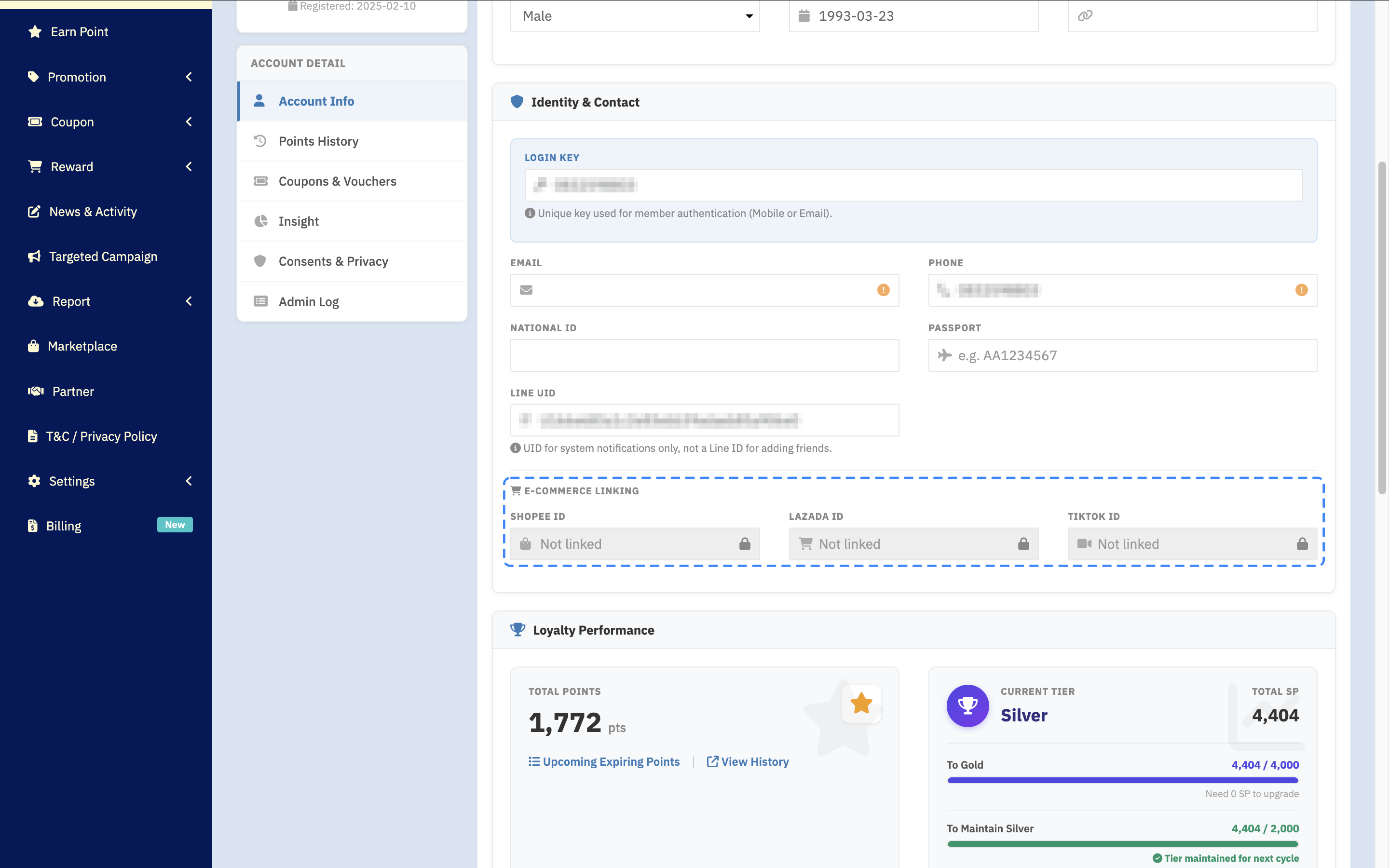
Step 3 Read it line by line
The section carries 3 lines, one per marketplace.
Reading it is direct: a line holding an ID means that marketplace is linked, and a line that is Not linked — greyed-out placeholder text with a padlock icon at the end of the field, not a blank box — means it is not. That wording stays English in Thai mode as well. The 3 are independent, so a member having linked Shopee while leaving Lazada unlinked is perfectly normal.
✅ Confirm it worked: read the line for the marketplace the customer named and hold it against what they told you. If that line reads Not linked, you have found the cause — the system has no way of knowing that marketplace account belongs to this member — and the customer needs to link it. If the line holds an ID, linking is not the cause, and the case should go to an administrator to look at something else.
Wording for a customer whose line reads Not linked
Once you find the line reading Not linked, be careful how you word it, because this is where customers are most easily misled.
Linking is something the customer does from their own side. An administrator cannot type an ID into this page, since it only displays. Telling the customer you will sort it out for them sends them down the wrong path. What helps is telling them what they have to do.
Purchases made before linking and purchases made after are separate matters. When the customer asks about older orders placed before they linked, do not promise those will be credited. Say you will look into it and pass the case on, because crediting points retrospectively has to go through whoever your team has authorised to approve it.
Common Problems
Frequently Asked Questions
Q: Does a Not linked line mean the customer has no account on that marketplace?
A: No. The line says only whether a marketplace account has been linked to their membership here. The customer may well use Shopee regularly and simply never have connected it to your loyalty programme.
Q: How many marketplaces can one member link?
A: The section carries 3 separate lines — Shopee, Lazada and TikTok — so a member can link all 3 at once, or just one.
Q: Can an administrator edit the ID on one of these lines?
A: The section displays only; the profile page offers no field to edit. If an edit genuinely has to happen, raise it with an administrator on your team to handle through the proper process.
Q: Can several members be checked at once?
A: This page shows one member at a time, since it is part of an individual profile. For a picture across many members, ask an administrator on your team about reporting.
Next Step
Now that you know whether the account is linked, the next thing is reading the rest of the profile properly, because the same page also carries the points balance, the tier, and the tags attached to the customer — all of which help you answer their questions on the same call.
Read Next