

Scroll to the foot of the Dashboard and you meet 4 cards in 2 rows. All 4 answer the same question from different angles — who or what performed best that month — but no 2 of them use the same columns, which is where people get stuck.
⚡ Quick Path:
Dashboard→ scroll to the bottom → 4 cards in 2 rows
Requirements before you start
- Access to the
Dashboardmenu — it is the first item in the left menu bar. If you cannot see it, ask an administrator on your team to grant access first. - The month you want already selected — these cards are tied to the month set at the top right, so set it before reading any ranking.
- Nothing else to prepare — these cards are read-only tables. There is nothing here to press by mistake.
The position of the 4 cards
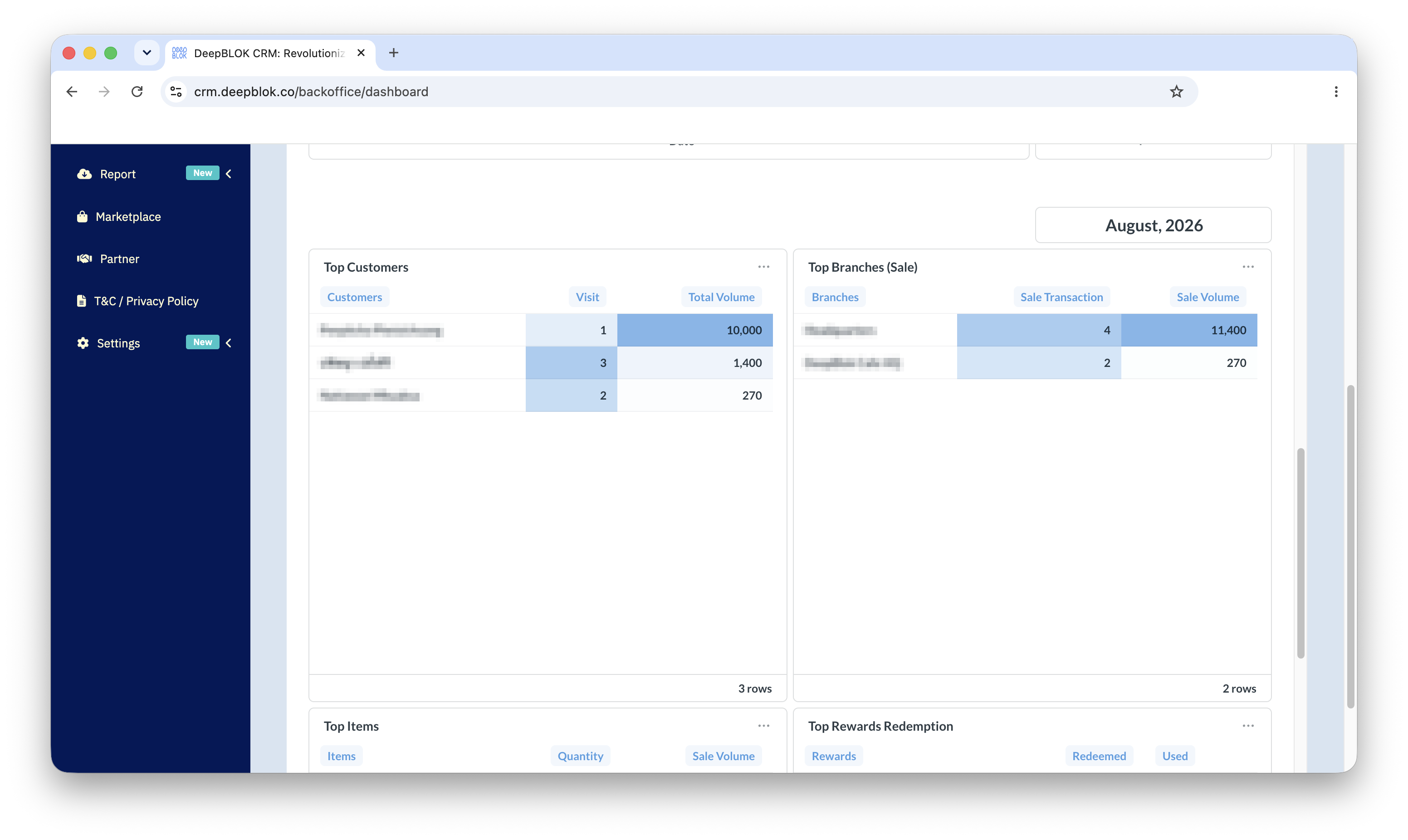
The 4 cards are at the very bottom of the board, below the sales group, laid out in 2 rows. The top row holds Top Customers on the left and Top Branches (Sale) on the right. The bottom row holds Top Items on the left and Top Rewards Redemption on the right.
Above them, in the right-hand column, sits a month label. That label tells you which month the ranking covers. Change the month at the top right of the page and all 4 cards recalculate.
The columns in each card
Three of the cards carry 3 columns; Top Items carries only 2. The first column is always a name, and the rest use different words depending on what the card is about.
The count and the value on Top Customers and Top Branches
Both of these cards carry a count alongside a value, and the two do not always move together. A customer who came in 12 times and spent 69,220 baht in total is a different kind of customer from one who came twice and spent 6,000 — and each deserves different handling.
Always read the 2 columns together. A high total built from many small visits and a high total built from one heavy purchase are telling you different things.
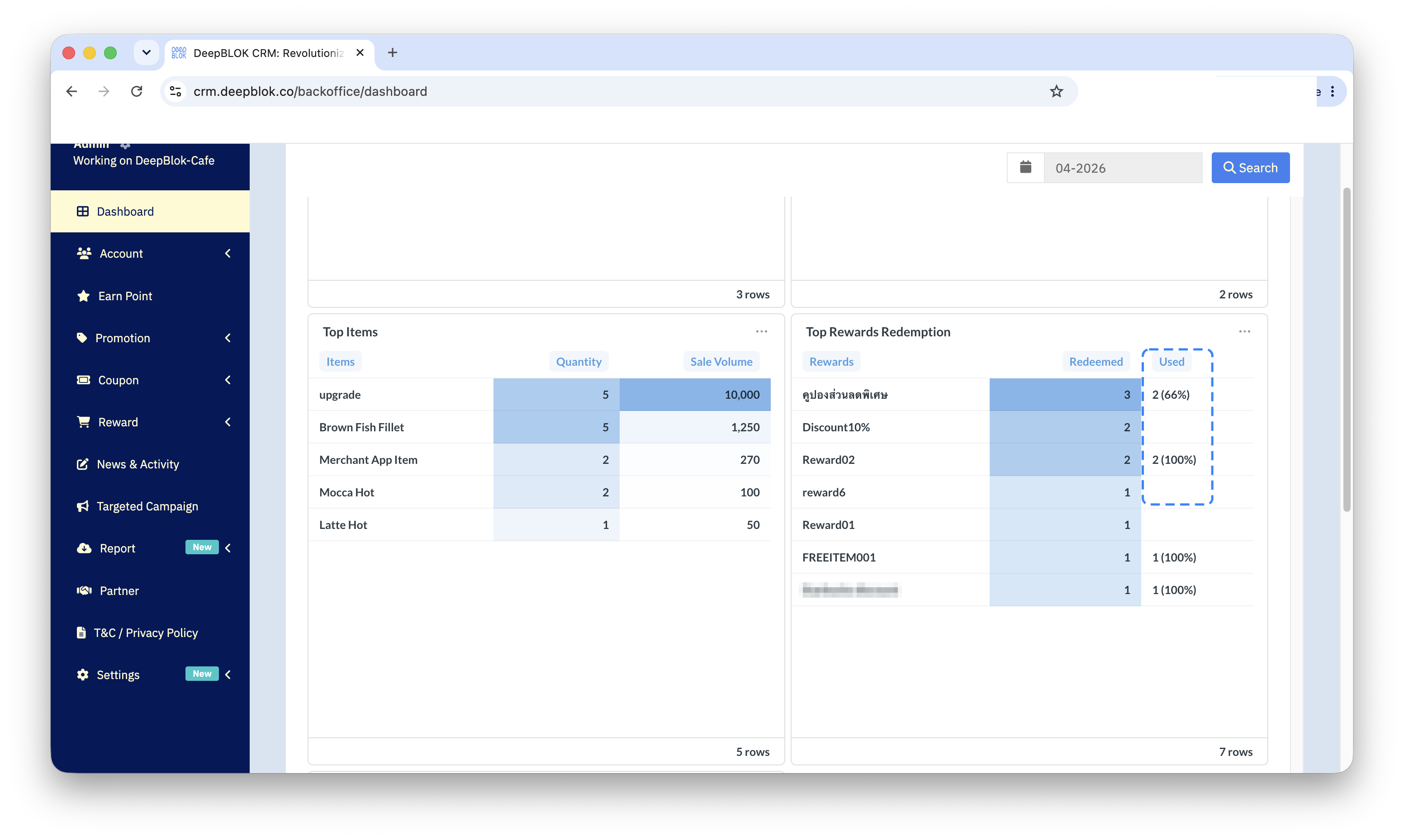
Redeemed and Used on Top Rewards Redemption
Redeemed is how many times customers exchanged points for that reward. Used is how many of those were actually consumed, with a bracketed percentage of the redeemed figure. If 13 were redeemed and 11 used, the column reads 11 (84%).
When none have been used yet, the column is left blank rather than showing a zero.
The gap between those 2 numbers is the most useful thing on this card. A reward that many people redeem but few actually use was attractive enough to claim, but not yet worth the trip to collect. That is a different problem from a reward nobody redeems at all, and it has a different fix.
⚠️ Note on when a reward counts as used: rewards are marked used at different moments depending on how each one is configured. Some count when the shop side confirms; others count the instant the customer confirms on their own screen. So before concluding that a reward is going unused, check how that particular reward is set up.
The blue shading and the sort order
The figures in these tables sit on a pale blue bar. Its intensity shows how high that value is relative to the other values in the same column — darkest is highest, fading down from there. The one column with no bar is Used, which prints as a plain figure.
The point worth knowing is that the shading is calculated per column, not per row. So a branch can carry a dark bar under Sale Transaction because it rang up plenty of bills, while its Sale Volume bar barely registers because each bill was small. Read the shading one column at a time, never across a row.
The ordering needs care. 3 of the cards arrive sorted high to low — Top Customers and Top Branches (Sale) by their value column, Top Rewards Redemption by how many were redeemed. Top Items is not sorted at all: its Quantity figures run up and down the column, so the top row is not the best-selling product. Read the whole column, or go by the depth of the shading instead.
✅ Check your understanding: try these 2 without scrolling back. If a row has a dark bar under Sale Transaction but a pale one under Sale Volume, what does that tell you? And what does a blank Used cell mean? If both come easily, you can read these 4 cards.
Common Problems
Frequently Asked Questions
Q: How many places do these cards rank?
A: The row count differs from card to card and depends on the data for that month. Every card prints its own count at the bottom right — 5 rows, for instance — so you can read off how many places it is showing. For a complete list, use the reports on the Report Center page.
Q: What is the difference between Visit and Sale Transaction?
A: Both are counts, but they sit on different cards and take different views. Visit is on Top Customers, so it counts per customer; Sale Transaction is on Top Branches (Sale), so it counts per branch. Compare figures only within the same card.
Q: What does a high Redeemed with a low Used tell me?
A: That customers claimed the reward but have not consumed it yet — perhaps they have no trip to the shop planned, or the coupon has not come close to expiring so there is no urgency. The pair is a good read on which rewards are attractive enough to claim but not yet compelling enough to collect.
Q: Do the ranking cards follow the selected month?
A: Yes. They sit beneath a month label, which marks the whole group as belonging to the selected month. Change the month at the top right, press Search, and all 4 recalculate for that month.