

Once a campaign is running, 2 questions come up again and again: are there enough coupons left, and are customers actually using the ones they were given? A bucket answers both, but on 2 separate pages — one for tracking down a single code, one for the whole bucket at a glance. This article covers both, and settles the thing that confuses people most: there are 2 "remaining" figures, and they do not match.
⚡ Quick Path:
Coupon→Coupon Bucket→the magnifier icon to find single coupons, or
the bar-chart icon for the whole bucket
📌 Good to know: both pages are for reading. Opening them changes nothing for customers holding coupons. The one exception is a delete button on the search page, which has its own warning below.
Requirements before you start
- Access to the
Couponmenu — if it is not in the left sidebar, ask an administrator on your team to grant access first. - Knowing which bucket you are looking at — every figure belongs to one bucket rather than to all of them together, so have the bucket name ready.
- The code itself, if you are tracing one — the search page takes a coupon code, a status and a date range; starting from the code is the fastest route.
The 4 statuses a code can be in
Whichever page you read, the same 4 statuses apply — and the overview page uses these colours in its proportion bars.
The whole bucket at a glance
Press the bar-chart icon, the last in the Actions column, and the system opens Stock Coupon List with the bucket's code in the heading — Stock Coupon List : COCO, for example.
The page does not treat the bucket as one pile. It breaks it down by lot, meaning each time coupons were added. Every lot gets a proportion bar, 2 sets of figures below it, and a card on the right saying where that lot came from and when, with a Report Lot button for a report on that lot alone.
2 "remaining" figures, and the one to plan with
"Remaining" appears twice on this page, and the 2 figures answer different questions:
Remaining (Undistribute)— how many you can still give out. Plan with this oneRemaining (Usable)— how many could still turn up at the counter, including codes already handed out. This is the shop floor's figure
⚠️ Watch out: do not use Remaining (Usable) to answer "how many can I still give out?" — it counts codes already in customers' hands, which cannot be handed out again.
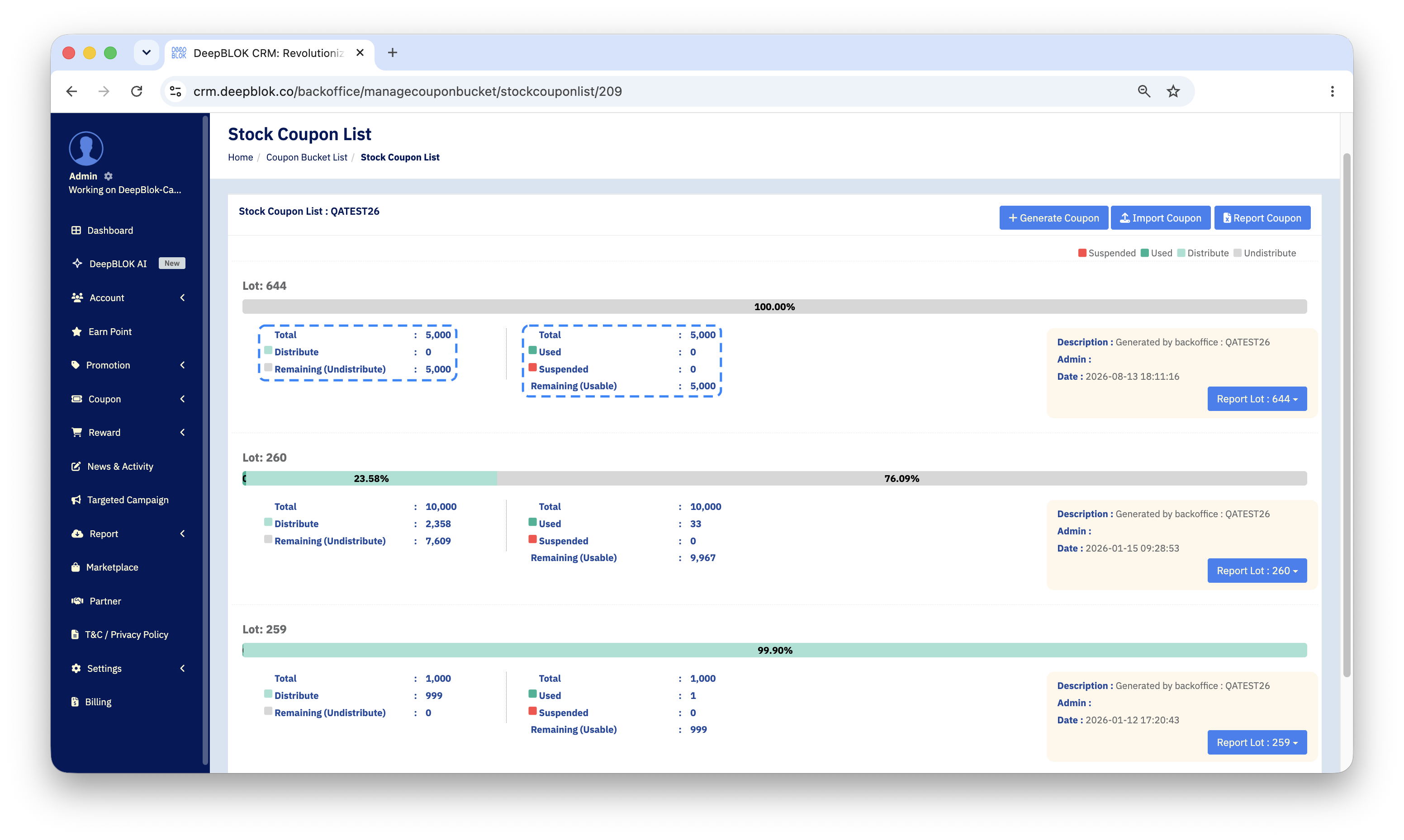
The yellow card beside each lot traces where it came from: Description says how the lot arrived, and Date gives the time it was added.
Finding a single code
When a customer calls about one code, the overview page cannot help; the search page can. Press the magnifier icon in the Actions column and the system opens Coupon List Search.
The search panel offers 5 controls: a coupon code, a SystemDistribute : dropdown offering Coupon or Gift, a second dropdown carrying no label at all, a start date and an end date. Above them, a red line reads *You must input either the coupon code or date range then remaining blanks. — meaning you must give at least a code or a date range. Searching with everything empty will not work; the rest can be left blank.
The unlabelled dropdown holds 2 kinds of choice in one list: date types (DateDistribute for the date handed out, DateUse for the date redeemed, DateExpire for the expiry) and coupon statuses.
If you have typed a date range, pick the date type that matches what you are chasing — the same range returns a different set once you switch types.
Press Search and the results fill the table below, one row per code, with its status, the date it was used, its expiry, and where it was sent.
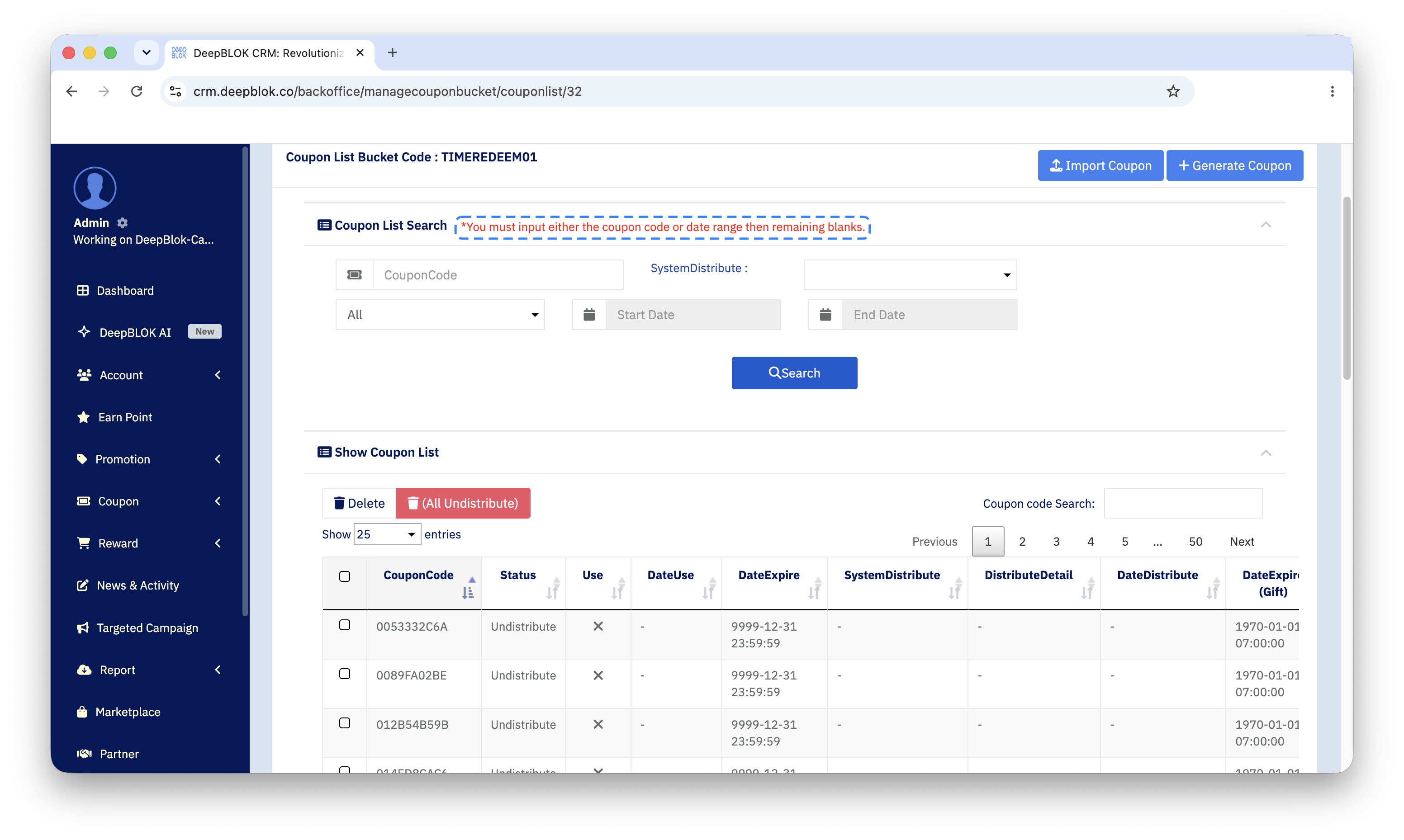
2 columns are easy to read the wrong way round: DateExpire is the code's own expiry, and DateExpire (Gift) is the expiry of the privilege the customer received.
📌 Good to know: each row ends with a Request button for asking to change that code's status, which is what you use when a customer reports one that will not work. Above the table sits a red delete button marked (All Undistribute), which removes every coupon not yet handed out in one go. Treat pressing it as irreversible.
✅ Check your understanding: to answer whether you can still give codes out, read Remaining (Undistribute), not Remaining (Usable).
Common Problems
Frequently Asked Questions
Q: What is the difference between Distribute and Used?
A: Distribute means the code has left the bucket and is with a customer but has not been used at the counter. Used means it has. The gap between them is the stretch where a customer is holding a coupon they have not yet spent.
Q: How do Report Lot and Report Coupon differ?
A: Report Lot reports on the lot you pressed it from; Report Coupon covers every lot in the bucket. For a whole-bucket total, the second is quicker than adding lots up by hand.
Q: What puts a code into Suspended?