

The left sidebar carries a Coupon menu and a Reward menu right beside each other, which makes them look like 2 options to choose between. They do not replace each other — they are 2 layers of one job. A Reward is what the customer sees and redeems points for; a Coupon is the code the system draws from a store and hands over afterwards.
⚡ Quick Path:
Coupon(prepare the bucket) →Reward(build the reward) → theReward Settingstab → pick a bucket inCoupon bucket→Save→Publish
📌 Good to know: this article is here to settle the difference, not to walk through a task. Building a bucket and building a reward are separate articles, both linked at the end.
Requirements before you start
- Permission for the
CouponandRewardmenus — if either is missing from the left sidebar, we recommend asking an administrator on your team to grant it, since the menu list each account sees depends on its user role. - Clarity about what the customer receives — an item collected at the counter and a discount that needs a code scanned are set up differently. This is the first question, and it decides everything else.
- Any coupons you already hold — if coupons exist in another system, have them ready as a
.csvfile. If they do not exist yet, the system can generate them to a format you define.
The jobs of a Reward and a Coupon
1. Reward The item a customer sees in the member app and redeems points for. It holds the name, image, description, terms, the number of points it costs, and the period it appears for. Rewards are built and edited from the Reward menu in the sidebar. A reward is what the customer chooses, so everything they read before deciding is entered here.
Which balance a reward's price is deducted from is set in the Credit type used field on the Reward Info tab. The options differ by brand; your own brand's names are listed under Settings → Credit Management. If you are unsure which to pick, check with the DeepBLOK team first.
2. Coupon and Coupon Bucket A coupon is one single-use code. A coupon bucket is the bucket those codes sit in, managed from the Coupon menu. Codes in a bucket are not yet anybody's; they leave it when a customer redeems a reward linked to it. A bucket is what the system draws from, not something the customer picks.
So the difference that actually helps you decide is not which one is better — it is the order. The reward is the front layer the customer meets; the bucket is the back layer that pays out.
The flow in the member app: from points to redeeming a coupon at the counter
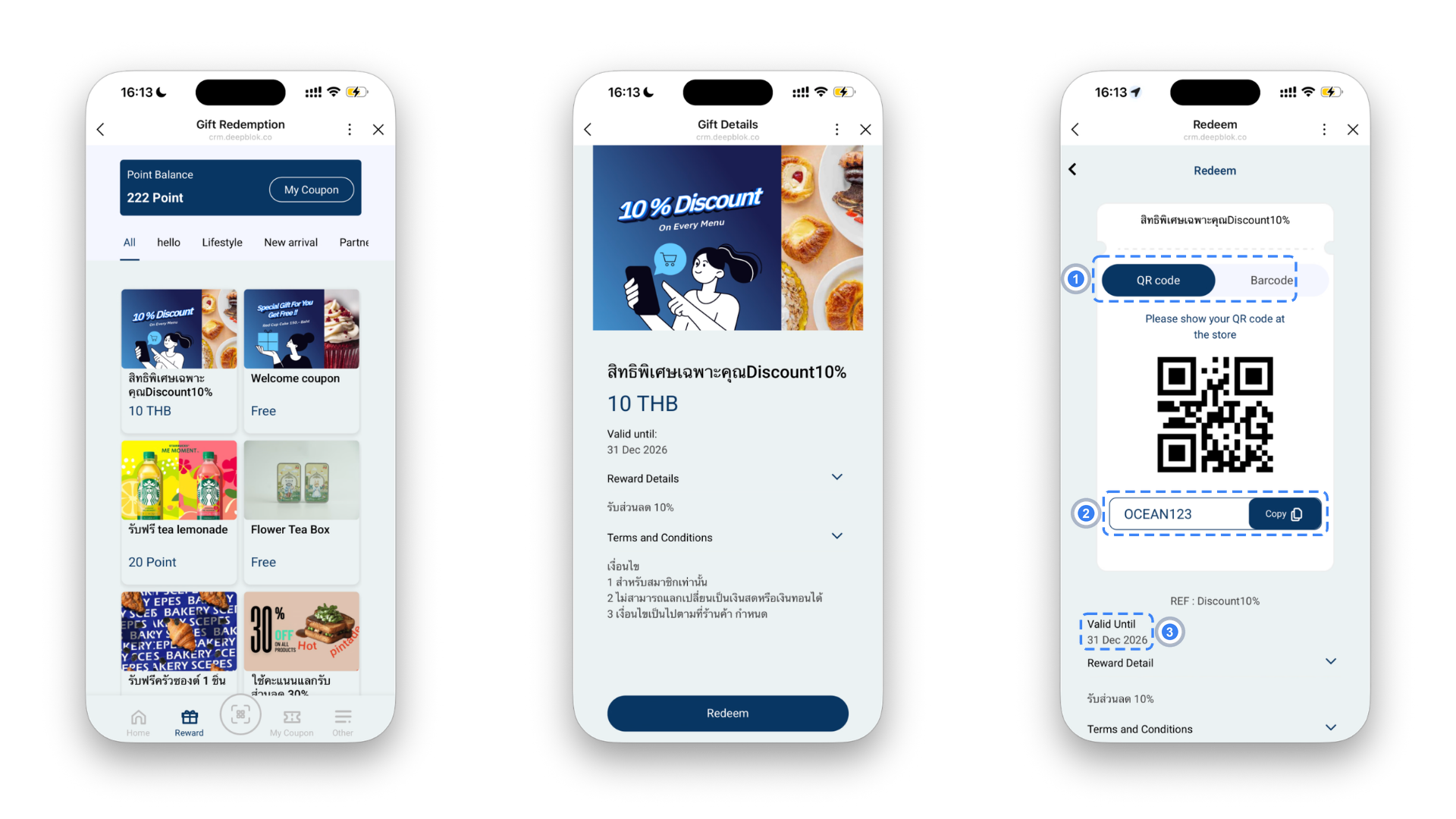
The customer side runs in 4 stages.
1. The reward list opens Rewards appear as cards with the points each one costs, and the customer's own point balance sits at the top.
2. The customer redeems The reward's detail screen shows the terms, the date it can be redeemed until, and the redeem button. Pressing it is the moment points are deducted.
3. The coupon waits in the customer's wallet After a successful redemption, what they received sits under คูปองของฉัน — their coupons — and is not usable until they open it at the counter.
4. They open the coupon and the system shows the code On opening it, the member app shows the Coupon Code as a QR code and a barcode for staff to scan, with the use-by date alongside. This screen can carry 2 more buttons, set on the reward: one sending the customer to an online store, and one for staff to mark the coupon used.
The 2 fields that connect a Reward to a Coupon Bucket
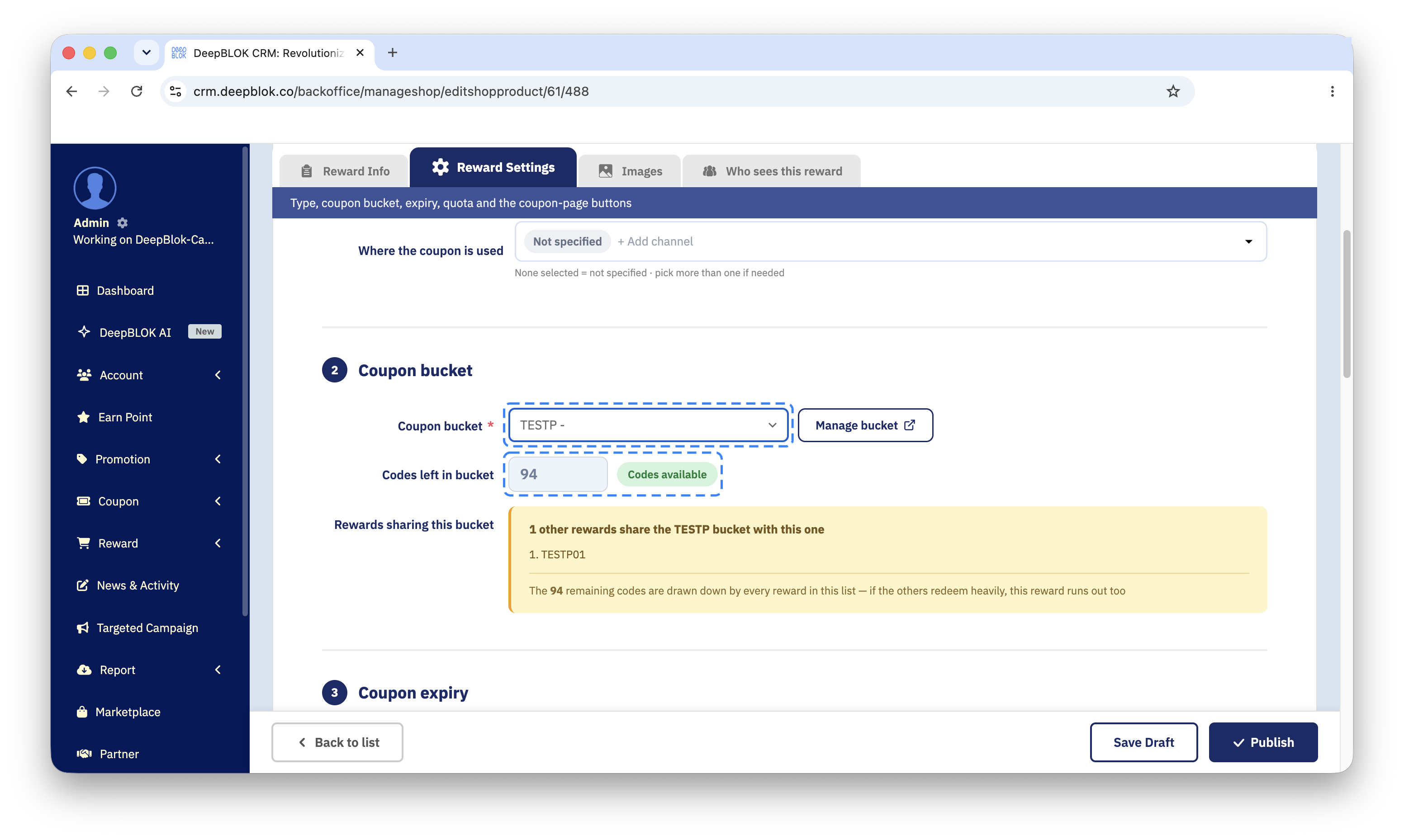
The connection is made in one place — the Reward Settings tab on the reward's edit page — and not from the bucket side at all. 2 fields do the work.
1. Coupon bucket — the bucket picker Says which store this reward draws its coupons from. The options are the buckets that already exist, which is why a bucket has to come before the reward. The field carries a red asterisk and is checked by the publish gate, so a reward with no bucket chosen will not publish. It starts on Please select a coupon bucket — the system does not pick one for you.
2. Codes left in bucket — the coupons left A read-only row showing how many codes remain in the selected bucket, with a badge of only 2 states: Codes available and Out of stock. It tells you at a glance whether this reward still has anything to pay out. If the bucket is shared with other rewards, a Rewards sharing this bucket box appears underneath with the list.
⚠️ One thing to watch: the publish gate checks whether a bucket has been chosen, not whether that bucket holds any codes. A reward pointing at an empty bucket therefore publishes fine, and the problem surfaces on the customer's side instead — they see the reward but cannot redeem it. So read the Codes left in bucket row with your own eyes before you publish.
The Coupon menu side is not where rewards get attached; it is where the quantity of coupons is looked after. The Coupon Bucket List table carries a Coupon Count column splitting the figure by status, so you can see how many codes have gone out and how many have actually been used.