

Requests like these arrive with your team directly, through the contact channel your privacy policy publishes. Your team's job is to receive it, verify who is asking, log it, complete it, and close the loop. This article puts that work in order and says what you can read from Backoffice along the way.
⚡ Quick Path: log the request → verify the requester → read the
Consents & Privacytab → stop marketing → raise it with your DeepBLOK team → confirm back and file the evidence
This is operational guidance, not legal advice. Use it alongside your company's privacy policy and your own legal team's direction.
Requirements before you start
- A named owner — decide in advance who receives these and who decides. Requests like these run against a deadline, and hunting for an owner after one arrives is the single biggest cause of a late response.
- A receiving channel that matches what you published — the same channel named in your privacy policy per the article on adding your privacy policy.
- A request log — at minimum: date received, channel, requester details, what was asked, how identity was verified, who actioned it, and the date you replied.
- A response time your team works to — take it from your own privacy policy and your legal team's direction, and tell the customer that time frame when you acknowledge the request.
- Access to the member detail page — to read the current status per the article on checking a member's consent status.
2 Kinds of request, separated at the start
Asking one clarifying question up front keeps the team from acting on the wrong thing and having to go back.
⚠️ Watch out: a deletion request affects the customer's points balance and membership history. This step is important enough to explain the consequences and get the customer's written confirmation before acting, every time.
The process in 6 steps
1. Log the request the moment it arrives
Record the date and the channel it arrived on first — that's where the response time you published starts counting.
2. Verify the requester
Confirm the requester is the account holder using the method your team has agreed, such as matching details already held on the member record. This step stops someone else withdrawing consent or requesting deletion on the account holder's behalf.
📌 Good to know: don't collect additional data you don't need in order to verify identity — a full copy of an ID document, for example — when what's already on the record is enough. Asking for more than necessary means collecting more personal data with no justification behind it.
3. Read the customer's current status in Backoffice
Open Account → Search / Detail → the member → Consents & Privacy, and read the current per-channel status and the document versions they accepted. How to read the whole page is the article on checking a member's consent status.
Save a screenshot of the status as at the date of the request into your request log — it's the evidence of what the position was before you acted.
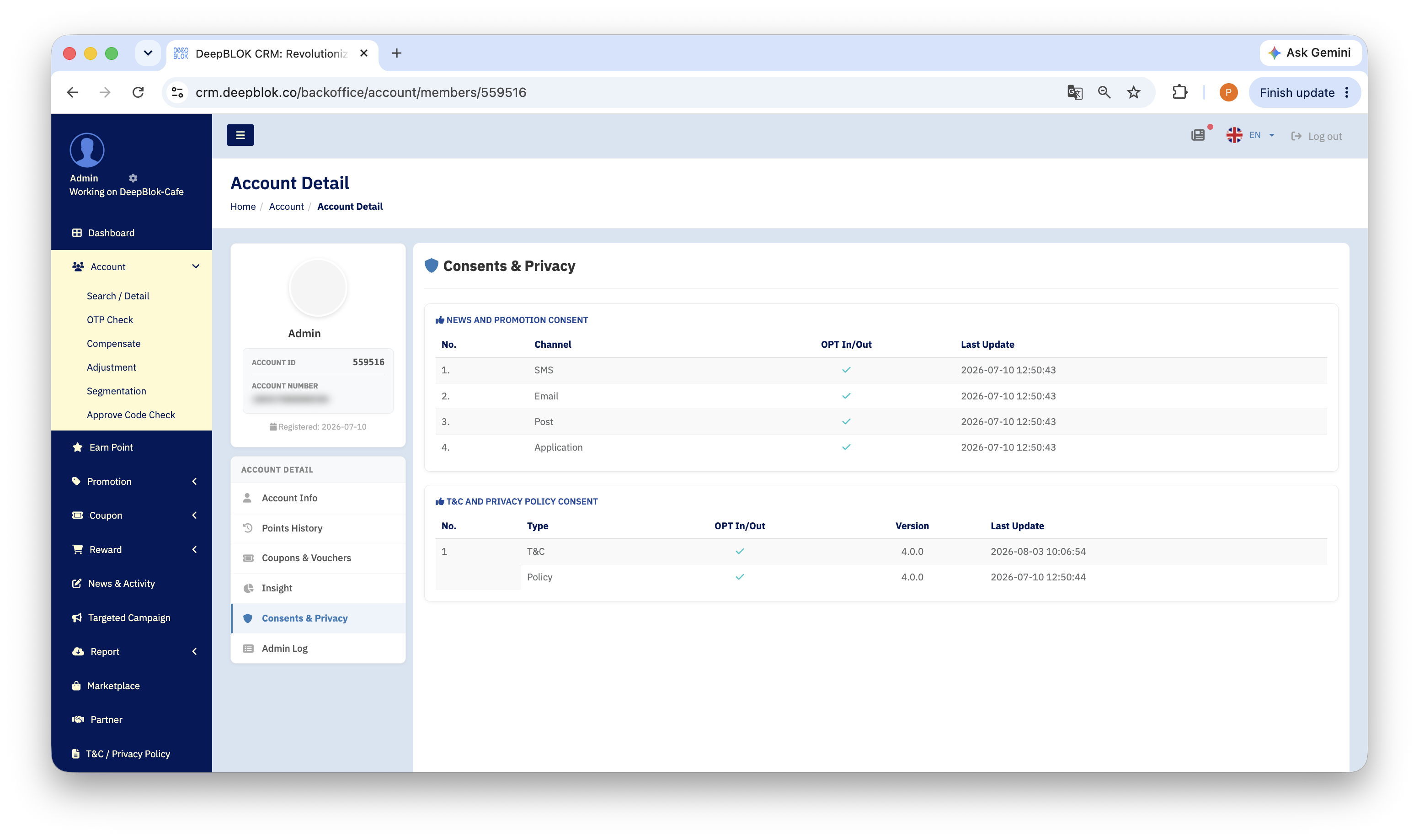
4. Stop marketing to that customer immediately
Tell your marketing team to exclude that customer from campaigns going out. This can be done the same day the request arrives, and it's the fastest thing the customer will notice as proof their request is being handled.
5. Raise it with the DeepBLOK team that looks after your account
Send the request to the DeepBLOK team looking after your account, with enough to identify the account precisely: the member account number, what was asked, the date received, and the response time you gave the customer.
Send all of this in one go
- The member account number and
ACCOUNT IDfrom the card on the member detail page - The type of request, per the table above
- The date received and the response time you gave the customer
- Confirmation that identity was verified, and by what method
6. Confirm back to the customer and close the log
Once it's done, tell the customer in writing what was done and from what date it takes effect, then record the reply date in your request log.
✅ Confirm it worked: open that customer's
Consents & Privacytab again and compare it with the screenshot from step 3 to see the status has changed as requested. Then check the request log holds the date received, the verification method, who actioned it, and the reply date. Those 2 things are the first evidence an internal audit will ask for.
A note on the channel: these requests reach your team, not a button in the app
This is worth everyone on the counter and in customer care knowing from the start.
There is no self-service route for members to withdraw consent or delete their own data. Every request therefore reaches the brand — your team — and your team acts on it.
What to tell the customer: that your team has received the request, will action it within the time frame published in your privacy policy, and will confirm when it's done. That tells them how long to wait and matches what the system can actually do.
What to avoid: telling the customer to go and withdraw consent themselves in the app. They'll hunt for a control that isn't there and have to contact you again, which delays everything while the clock is running.
What Backoffice does for you here: it lets you read the customer's current status immediately on the Consents & Privacy tab, and see who has changed that customer's record on the Admin Log tab per the article on checking the Admin Log. Together, those let you answer the customer with facts on the very first contact.
What to explain before acting on a deletion request
Explaining the consequences first is what prevents disputes later, and it's worth doing in writing.
- How their remaining points and benefits will be affected
- What happens to any coupons or rewards they've claimed but not yet used
- That coming back later means signing up again and starting from zero
- That some data may have to be retained under applicable law or regulation — follow your legal team's direction and what your privacy policy says
- The exact effective date once it's done
Common Problems
Frequently Asked Questions
Q: Can customers withdraw consent themselves in the app?
A: These requests come to the brand to action, so your team receives them and takes it from there. When you reply, say that the request has been received, that it will be actioned within the time frame published in your privacy policy, and that you'll confirm when it's done.
Q: If a customer withdraws marketing consent, are they still a member?
A: Yes. Marketing consent and membership are separate — the Consents & Privacy page makes that visible by keeping per-channel news consent apart from document acceptance. A member with no marketing consent but both documents accepted still uses their points and benefits as normal.
Q: How many days do we have to complete it?
A: Work to the time frame published in your company's privacy policy and set by your legal team. What matters operationally is telling the customer that time frame when the request arrives, and recording both the date received and the date you replied.
Q: What should we keep as evidence?
A: At minimum a request log with the date received, the channel, the identity-verification method, what was asked, who actioned it, and the reply date — plus the screenshot of the Consents & Privacy status as at the date of the request. That set is the first thing an internal audit will ask to see.
Next Step
With a process in place, the thing to check next is whether the privacy policy you've published names a contact channel and a response time your team can actually meet — what's written in the policy is what customers will hold you to.
Read Next