

This system uses several pairs of terms that sound alike, and in places the same thing goes by different names depending on the screen. New users get stuck on the vocabulary before they reach the actual work. This page gathers the common terms into families.
⚡ Quick Path:
Creditis the umbrella term for points → split intoPointfor redeeming rewards andSP Pointfor tier progression · aRewardis what the customer exchanges points for · aCouponis the code they get afterwards · aCoupon Bucketis the store those coupons come from
The points family: Credit, Point and SP Point
The pair that causes the most confusion is Credit and Point, because in everyday speech both translate as "points". In the system they are not the same word.
Credit is the umbrella term for what the system grants a member; which kind it is comes from the Credit code. So when you meet a field named Credit Amount, look at the selected Credit code to know what is actually being granted.
To find out how many kinds your brand runs, go to Settings → Credit Management, which opens Credit List — a short table with one row per kind. Three are standard:
🚨 Each kind carries its own expiry. The Credit Expiration column belongs to that row alone, not to all credits at once, so Point and Tier Point can expire on different rules. When a customer asks when their points expire, ask which kind they mean first.
📌 Good to know: a code like SP_POINT is the system's, but the displayed name is the brand's, so one balance can go by several names. Your brand's own names are listed under Settings → Credit Management.
SP stands for SPending. Some pages abbreviate it to SP Point, others spell it out as SPending Point. Both refer to the same thing.
There is only one distinction to remember: Point is spent on rewards, SP Point moves a customer up the tiers. A single customer holds both balances at once, and redeeming a reward does not knock them down a tier, because the two are separate balances.
The rewards family: Reward, Coupon and Coupon Bucket
These three sit at different points on the same path. Get the order straight and they stop being confusing.
The sequence is: the customer spends points on a Reward; when they press use, the system displays the Coupon Code tied to that reward for that customer; and the code it hands over came from a Coupon Bucket, a store of coupons prepared in advance.
How to Set a Reward's Expiry and Quotas covers setting the quota and expiry.
The thing to watch is that several rewards can draw from the same coupon bucket, so the coupons inside are shared rather than belonging to any one reward.
The grouping family: Tier, Segment and Target List
All three mean "a group of customers", but each is built a different way and used for a different job.
1. Tier — the membership level The level a customer climbs as they spend, such as Bronze, Silver, Gold. The system promotes them automatically against the conditions you set; you do not assign it by hand. Its most common use is deciding who can see which reward.
2. Segment — a group built from conditions A group you create yourself by setting conditions, which the system then fills with whoever matches. Use it to pick out a target audience for a campaign. Where a Tier is about level, a Segment is about whatever conditions you choose.
3. Target List — a list you upload A list of member account numbers uploaded as a .csv to restrict who can see one specific reward. Unlike the other 2 there are no conditions at all — it is a fixed list you name yourself.
Terms you meet in reports and on the board
1. Earn and Burn Earn is points issued to customers; Burn is points customers have spent. The two are opposites and appear both in report names and in the Dashboard card titles.
2. Float Point Points issued but not yet spent — the points still sitting outstanding against the business. It is a figure worth watching, because it is a liability waiting to be claimed at any time.
3. Void A cancelled entry, used to separate what was cancelled from what stands — the Reward Use and Cancel report, for instance, separates redeemed rewards that were used from those that were cancelled.
4. EOD and EOM Data cycles. EOD stands for End of Day, the daily cycle; EOM stands for End of Month, the monthly one. On the Report Center page — see Downloading Reports from the Report Center — the cycle shows up in the period fields — some reports ask for a date range, others for a single month. Report names in the current system no longer start with either prefix, so if you meet one in older documentation, check it against the list on the Report Setting page.
5. Redeemed and Used Redeemed is how many times customers exchanged points for a reward; Used is how many were actually consumed at the counter. The 2 figures need not match, and the gap between them is rewards claimed but not yet collected.
6. Login Key and Contact Login Key is the phone number or email address a customer signs up and logs in with — the account detail page labels it LOGIN KEY. Contact Phone No. and Contact Email in the member reports are ways to reach the customer; they may or may not match the Login Key, and they can't be used to log in.
The same thing written differently on different screens
This trips people up about as much as the vocabulary itself, because a few things carry several names depending on the page.
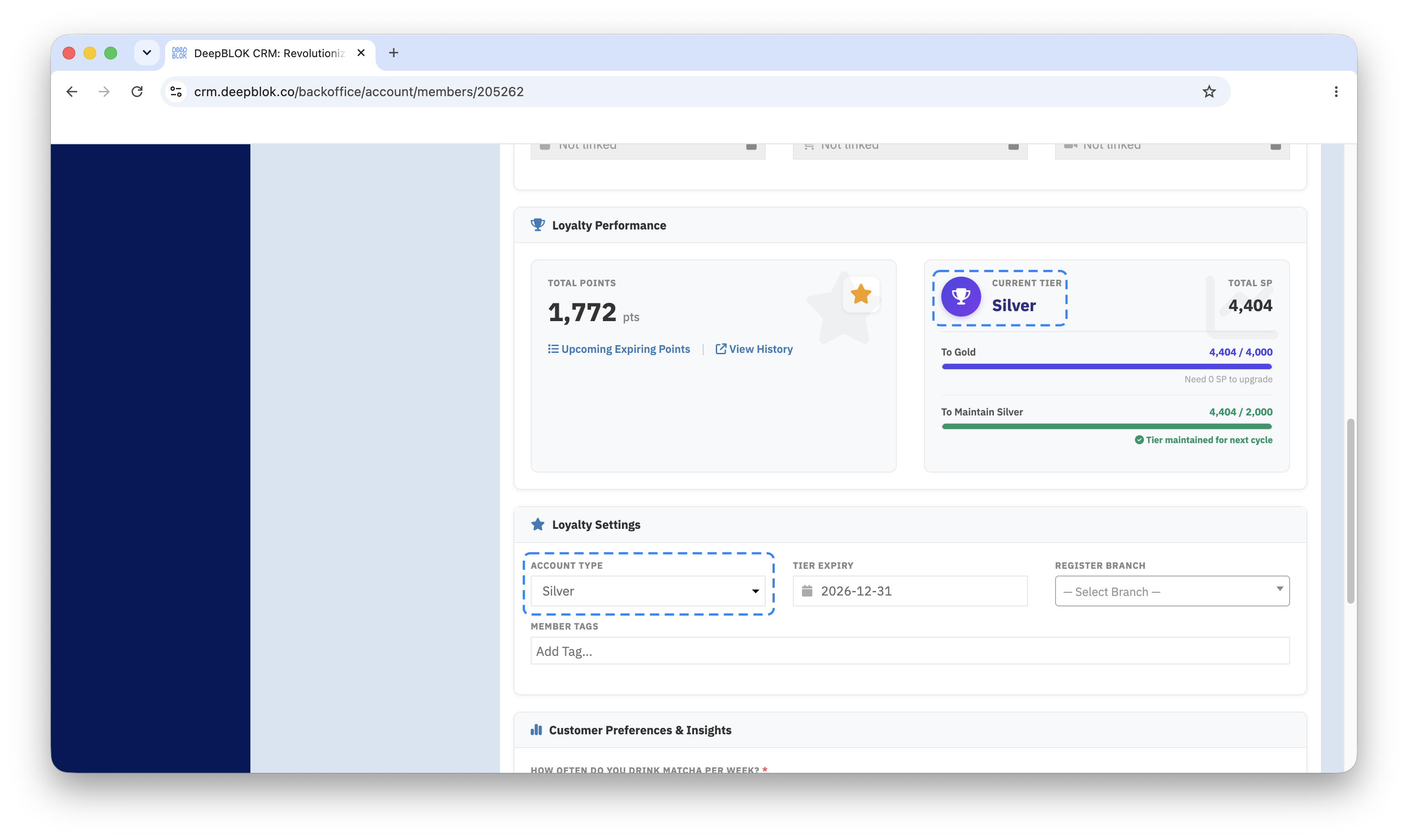
Membership level goes by 3 names: Account Type under the Loyalty Settings tab, Current Tier under Loyalty Performance, and Member Tiers on the Dashboard. All three are the same idea.
Points issued and spent on the Dashboard: the charts are titled Point Movement (Point Earn) and Point Movement (Point Burn), while the stat cards beside them use the shorter Point Earns and Point Burns. Same subject.
Coupon Bucket appears under several names: Coupon Bucket in the submenu, Coupon Bucket List as the list page, Bucket Code for the bucket's own reference, Coupon bucket as the picker in a reward's Reward Settings tab, and Codes left in bucket where the remaining count is shown. All refer to the same bucket.
A reward's owner: the menu for creating one is called Partner — see Adding a Partner for Rewards from Another Brand — but the field on a reward's page reads Brand / Partner, because the same list holds your own brand alongside external partners.
✅ Check your understanding: try these 3 without scrolling back. Does redeeming a reward drop a customer's tier? What is the code called that a customer receives after pressing use on a reward? And what does Float Point count? If all three come easily, you have the shape of this vocabulary.
Frequently Asked Questions
Q: What does the SP in SP Point stand for?
A: It stands for SPending. The system writes the same term 2 ways: the Compensation and Adjustment pages spell it out as SPending Point in the Credit code list, while the promotion setup page abbreviates it to SP Point. What it does is move customers up the tiers — a separate balance from the one spent on rewards, though the Edit Reward page can price a reward in SP_POINT, so it is not true that it cannot be redeemed.
Q: Does redeeming a reward drop a customer's tier?
A: No. Redeeming draws down the Point balance, while the tier is calculated from SP Point — 2 separate balances. Customers can redeem without affecting the tier they have climbed to, and you can tell them so directly.
Q: How many Credit codes are there?
A: There is no fixed number, because the list is meant to be extended. Settings → Credit Management carries a Create Credit button at the top, which is where new kinds come from. The ones that ship with the system and turn up at nearly every brand are POINT and SP_POINT; anything beyond those depends on what the brand set up. For your own brand's real list, open the Credit Management page, which shows every kind alongside the expiry rule set for each.
Q: Can a Segment be used in place of a Target List?
A: No — they are built differently and used in different places. A Segment is built from conditions and used to pick a target audience; a Target List is an uploaded file of names used to restrict who can see one particular reward.
Next Step
If the pair still not quite clear is Reward and Coupon, the next thing to read is the full treatment of those two. They differ not only in meaning but in the order you have to create them, and getting that order wrong costs a trip back to fix it.
Read Next